
With over 7.4 million subscribers as of September 2009, MTN is easily Ghana’s leading telecommunications network, offering mobile telephony services, Internet connectivity and more.
I recently picked up an MTN “Exclusive 3G Pack” for 100 Ghana Cedis (about $69) and have used it extensively for about 14 days mainly in Accra. The information below is based on some of my experience using the mobile broadband service.
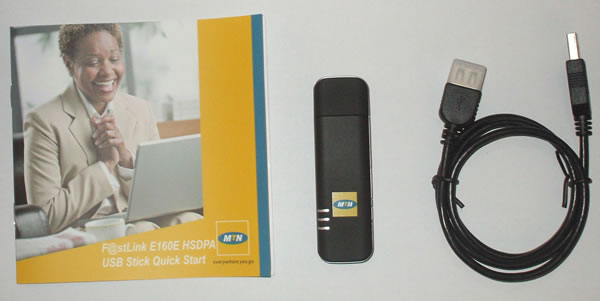
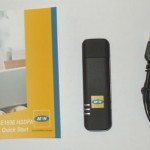
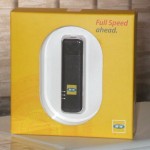
The 3G pack contained:
- an MTN-branded Huawei E160E USB stick
- an MTN Internet SIM
Technical Specification
Find the technical specifications and some explanation of the USB device, below:
- Network: HSDPA/UMTS (850/1900/2100MHz) & GSM/GPRS/EDGE (850/900/1800/1900MHz). This means the device can work across most GSM networks, globally.
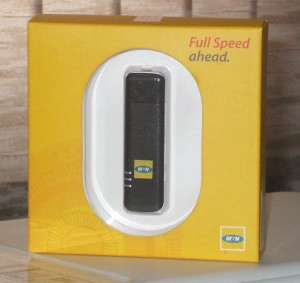
- Speed: It supports 3.6Mbps HSDPA services. Since MTN offers connectivity over a 3.5G network, users can experience theoretical speeds of up to 3.6Mbps which is very high by today’s best standards.
- Memory: Micro SD Card Slot. It supports up to 4GB storage when a MicroSD card is placed in the included slot and the device can double as a USB storage device.
- Communication: SMS services – users can send and receive text messages through the software bundled with the device. Though the device can support PC voice, the function is not enabled by MTN.
- Support data statistics: The bundled software offers extensive graphical statistics.
- Plug & Play: it works almost as soon as it is connected to a PC or Mac. It requires no seperate CD installation software.
- Cross-platform: Support Windows 2000, Windows XP, Windows Vista and Mac Operating Systems. From my tests, I also got it to work on an Ubuntu desktop version operating system.
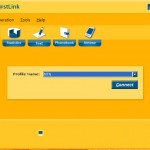
MTN F@stlink software
Installing the device was a fast and straight-forward process. The easy-to-use MTN F@stlink (the dialling software) was soon installed.
MTN F@stlink comes with the following features:
- Connection: allows users to connect and disconnect to the Internet
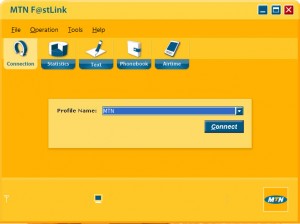
- Statistics: displays real-time statistics whilst the user is connected to the Internet and includes a daily, monthly and yearly data counter.
- Text: enables the user to send and receive text messages as well as manage existing text messages.
- Phonebook: a simple contact management system that includes the following fields – Name, Mobile Number, Office Number, Home Number, E-mail Address.
- Airtime: enables the user to check existing data balance and as well as load a regular MTN airtime voucher.
MTN Internet SIM
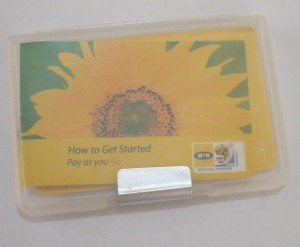
The special SIM card bundled with the MTN “Exclusive 3G pack” had 2 Ghana Cedis airtime preloaded with amounted to 50MB data. Since this was a special SIM, the Internet tariff is lower, compared to the normal MTN SIMs. In order to compare the data tariff with that of Zain, I loaded 30 Ghana Cedis airtime and the total data derived amounted to 1.2GB. 400MB of data was credited each time I loaded a 10 Ghana Cedis airtime voucher. Note that “Zain Lite” Internet package offers only 1GB of data for 30 Ghana cedis.
The MTN Internet SIM is restricted from making or receiving calls by MTN even though it comes with a regular MTN mobile number. Calling the number, one hears the ringing buzz but there is no reaction on the PC nor any notice of a call. One hears an error message when a call attempt is made from the Internet SIM.
I tried the special SIM on a mobile phone and it worked normally except for not taking nor making calls.
Usage
I tested the connectivity from McCarthy Hill area in Accra and experienced a signal strength that varied between 95 and 99%, with real download speeds reaching 1.8Mbps. MTN Ghana’s website www.mtn.com.gh loaded the fastest since they host their own website. Real speeds elsewhere might vary according to the time of day (peak or off-peak period), number of people connected to a particular base station, speed of travel (if the user is in motion), and signal strength.
Much of Accra is covered by MTN’s 3.5G network with EDGE filling the gap in patches without 3.5G. Using the service on the outskirts of Accra where only GPRS is available, speeds did not exceed a meagre 5 kbps. This implies that MTN Broadband is best used where there is 3.5G network coverage.
According to MTN Ghana’s website:
MTN 3G service is available in Accra, Tema, Kumasi, Takoradi, Tarkwa, Bogoso, Ho, Koforidua, Cape Coast, Kasoa, Winneba, Tamale, Sunyani, Kenyasi, Techiman, Obuasi, Bolgatanga, Wa, Prestea, Damine, Ntoroso, Bibiani, Besomtwi, Bekwai, Aflao, Chirano and still counting.
In summary, MTN’s Mobile Broadband service is ideal is for home or small business users who have limited data usage but want to experience the high speed 3.5G technology offers. The entry fees are affordable as are the data tariffs. It is advisable to check if your area has 3.5G coverage before getting on board. You can do so by manually scanning the networks from a 3.5G phone.
MTN offers another device for connectivity, aside the USB stick:
3.5G F@stLink Router
MTN 3.5 G F@stlink router is a 3G cellular modem,which has an embedded wireless hotspot, with four Ethernet ports and a traditional phone jack. It is perfect for home or small offices and allows a user to share a connection with multiple users. The router may also serve as a modem using the USB slot to offer a single connection to the user.
Did find this review useful or otherwise? Share your thoughts in the comments area.




Hi David, great review. One thing that I’m not clear with is with the tariffs you mentioned in the post.
Are they the promotional tariffs that MTN talks about on their site (100% bonus for 6 months) or those are the normal tariffs without the bonus.
I am not sure about that either. You might want to cross-check that from MTN.
Can’t get through to the MTN customer care line. I wonder why they give that 111 number to us in the first place
I think mtn should introduce data bundles for prepaid customers like zain.There is no 3.5g coverage in koforidua yet mtn has advertised the service on their website.Glo is laying optic fibre at koforidua and i hope internet will soon be affordable.
@Kotey. Even without bundles, MTN’s broadband tariff is as competitive as that of Zain; when you load the highest MTN recharge card denomination.
HI DAVID,HOW IS LIFE ,HOPE NORMAL.AM SORRY THAT VERRY SOON YOU MAY LOSE A LOTE OF PEOPLE.SIMPLE BECAUSE SINCE THERE ARE MANY NETWORKS AVIALABLE IN GHANA.MY PROBLEM IS IS TARIFF ON THE INTERNET.IS TOO MUCH FOR ME.LOOK AT TIGO”S TARIFF,FOR 24HRS GH[1.5.for MTN IS TOO MUCH .PLEASE KINDLY DO SOMETHING.GLO GHANA TOO IS COMING.THAKS
Kotey, thanks for your comments. I do not work for MTN nor speak for them, as you’re implying.
I am only a subscriber, just like you. My MTN Ghana Broadband review seeks to educate the populace before they buy.
Best wishes.
Well David as at now i am also using the Zain 3.5G modems. As you mentioned, comparing both of them, i think initially Zain was offering a better deal for their bundles before changing it the lite, etc.
Its now quite expensive to maintain for some of us who use it pretty heavily.Hope they come up with more affordable deals, or i can safely say we all will be moving to glo as soon as they hit the market.
Glo Ghana I reckon, would offer the best internet deal. A deal none of the other telecom providers can beat. My assumption is based on their glo-1 submarine fibre connectivity.
Hi David,
do you have any idea if buying the bundled kit would mean that the Huawei modem is locked only to MTN Ghana?
Thanks,
Justin
If it wasn’t locked, they wouldn’t sell it at the subsidized rate they’re doing.
Fair enough, might just get an unlocked modem and only buy the card from MTN, so I can switch between provider when I travel between countries. Thx.
I use 3G MTN Broadband at home for my studies, i cannot experience the high speed specified, why?
My laptop is Pentium M, 512MB RAM, 1.60GHZ Processor. with Widows Vista.
On top, the MTN Mast is just 100meters away from my house.
Why do i have to experience the limited speed. It delays too much. What is wrong?
You need to be sure 3.5G coverage extends to your area and that you’re not using the GPRS network. GPRS is wayyyy slower than 3.5G
Hi David, great suff you do for free. Hope helps your business! I have the same problem like Emmanuel in the Airport West Residential Area. Can you povide the APN for usage of the Broadband SIM card in a smartphone (PDA), pls. Is it the same like for GPRS/EDGE, i.e. “internet”? Any other code to be entered? (Unfortunately the Homepages keep quiet on such vital information.) Thanks, Klaus
The APN is same “internet” for any device: modem or phone.
i think MTN is the best network and the faster inter speed,big up to MTN,ZAIN is too slow,and i do not know how to subscribe to zain extra..in short Zain is bomd and they should pack their bags and move away.Thank God glo is inn and i hope glo is going to do it all for us,
Thanks a lot for the insights provided on your blog. It has really helped me in getting some information. I personally want to congratulate you for the good job you are doing because it helps students like me to get some information for research in related areas in telecommunication. Will definitely hear from me.
try to configure mtn f@astlink usb modem to work with ubuntu but given me hell.any help
try running the app in compatibilty mode or contact me on [email protected] for more info
In your article you stated MTN 3G service available at
………………………….,Kasoa,………
I stay at Kasoa and on the bawjiase road precisely but my device detects the GPRS network which i hate so much because it is way too slow, i would like to know why my modem doesn’t detect the 3G network or even EDGE whiles i’m in Kasoa?
I am not very sure where exactly “bawjiase” it but I am sure MTN has a 3G antenna in Kasoa central itself. Kasoa is listed on their website and I received MTN 3G signals around Kasoa New Barrier before. The best thing would be for you to ring their customer service helpline on 111, to cross-check with them.
Hi David, have u reviewed the zain internet service? I will like ur assessment and if possible Kasapa’s mobile2
I have not reviewed Zain Ghana’s mobile internet but wrote “Why I prefer Zain to MTN” over a year ago. Enjoy it.
How would this work with skype? I want to know whether I would be able to use skype for a couple hours every day reliably. Would you recommend this over Zain then or not considering you haven’t reviewed Zain yet (at least as you mentioned above)?
Thanks so much!
Deciding which network to go with should be a personal decision. There is not enough difference between MTN and Zain, for me to recommend one over the other.
In essence, check if either of them has 3G coverage at your present location. If they both do, go for the one that has the strongest signal strength.
About Skype, doing it over 3G is hardly ever a perfect experience. You might want to consider a monthly internet package as frequent Skype calls can quickly add up to create a huge data consumption.
i’d like to know how much 3 gigabytes of data on mtn cost. thanks
MTN Ghana does not really offer internet bundles. You need a special data SIM to enjoy low internet rates. Also, the higher the denomination of MTN airtime you load, the more megabytes of prepaid data MTN gives you. Visit the nearest MTN customer centre for help.
thanks man
most of the time, i got problem with the link, it doesn’t boost fast and all my credit goes, so i will be grateful if u can help me with the problem i am facing now, thank u.
i learnt there is a cheat browse free using the MTN f@stlink modem. Can anyone make it known to me? i will be greatful.
I heard there is a new I-service in town called cliq expresso.Would anyone kindly tell me where to locate them and whether their signal coverage is all over Ghana.Thanks
I had one of the expresso modems given to me to try and it was honestly the fastest network that I have experienced here, and consistently so. The prices seem to be in line with Zain and better than MTN’s in my opinion. I am however a newcomer to Ghana so I may not be the most reliable source, as I have only tested Zain, MTN and vodaphone prior to this.
Hope that helps Pierre
Thanks Suzanne.
This is really great piece of work my friend, This what we need to be doing as African’s to be well motivated into the Information and Technology world to streengthen our brothers in search of my Knowledge and Education. Big bro.
Thanks for your kind words, Don Lito.
pls i need your assistance i ave a pay as you Go MTN sim and i want to use it in Nigeria but i noticed its not connecting to internet via my USB modem. Please help out . thanks
Call MTN Ghana on 111 or visit the nearest MTN centre.
Thanks for ur concerns pls am in Nigeria already. aleady.
Thanks
David, is it wrong to have two e-mails? Or is it wrong to open the two mails one after the other? At times viewing my mails become difficult. It would slow down until I become frustrated and close it or I receive a message “the page has been reset or time out” But doing any other thing on the net goes smoothly. why?
i need to install my MTN modem on my ubuntu linux OS.
Just connect the modem. Ubuntu should recognize (and install) it automatically. Look under Mobile Broadband for the MTN settings.
HELLO MAN,great piece of work.
I HAVE A W35 ROUTER CONFIGURE TO THA ZAIN NETWORK ONLY, IS THERE IN ANY WAY I CAN UNLOCK IT IN OTHER TO BE USED WITH DIFFERENT OPERATORS ?
RESPECT MAN.
WHEN IS GLO GOING TO START OPERATING IN GHANA?
BIG THANKS MAN
I have never come across a solution for unlocking Ericsson W35.
MTN Ghana now has data bundles for prepaid internet users as you suggested.
I know this is old but has any one realised that when you buy GHC 20 for 1 GB you only get 950 of data or less.
And when you buy 40 GHC which is 2.5 GB of data you only get 2.2 of data they are not selling the real amount of data to people here. This is a crime and no one has said anything about it.
charley dave, pls show me how to configure my mtn sim to call my woman free
Hi Dave,
I would like to ask for your help. I’ve been reloading GH7.5 but it only lasted 30 minutes of use through skype calling.. how to lower the rates? Do i need to subscribe to Wireless Office?but how?Thanks
Hi Dave, I would like to ask for your help. I’ve been reloading GH7.5 but it only lasted 30 minutes of use through skype calling.. how to lower the rates? Do i need to subscribe to Wireless Office?but how?Thanks
MTN now has data packages. Please call 111 or visit an MTN centre for assistance.
I THINK MTN IS A FRAUD THEY ARE STEALING TOP UP ON THEIR INTERNET MODEMS HAS ANYONE EXPERIENCE THAT LATELY ?
[…] MTN Ghana recently introduced data packages for its prepaid mobile broadband subscribers. […]
from easy ;
i want to ask something ,i was talking to someone using laptop with mtn ; he bought 50gh and talking to the person yahoo messenger with calling it last 45 min,i want to find out if is possible ,b cos i still dnot get it ; i need ur help ;
I am worried. The deduction is too much. They will ask u to buy internet bundle, but when you do so the downloading speed reduces.
At times u cannot open any page at all you will be frustrated until you close.
[…] is noteworthy that Airtel launched a 3.5G network from their début. Their arch-rival MTN upgraded to 3.5G soon after and an aggressive broadband competition soon followed. Also, I am inclined to believe […]
please give me the mtn dial up number for ghana
how can i download mtnfirstlink